 Evabob
Contents
- Overview
- Why Evabob exists
- Paying people
- Getting paid
- Chat and the Evabob Agent
- Holding money for work
- Selling with a link
- Circles and collections
- Currencies and networks
- Receipts and activity
- Money for software
- Safety
- Fees
- What runs underneath
- Where things stand
- Glossary
Online version: docs.html on the Evabob website. For step-by-step instructions, see the Evabob user manual.
Overview
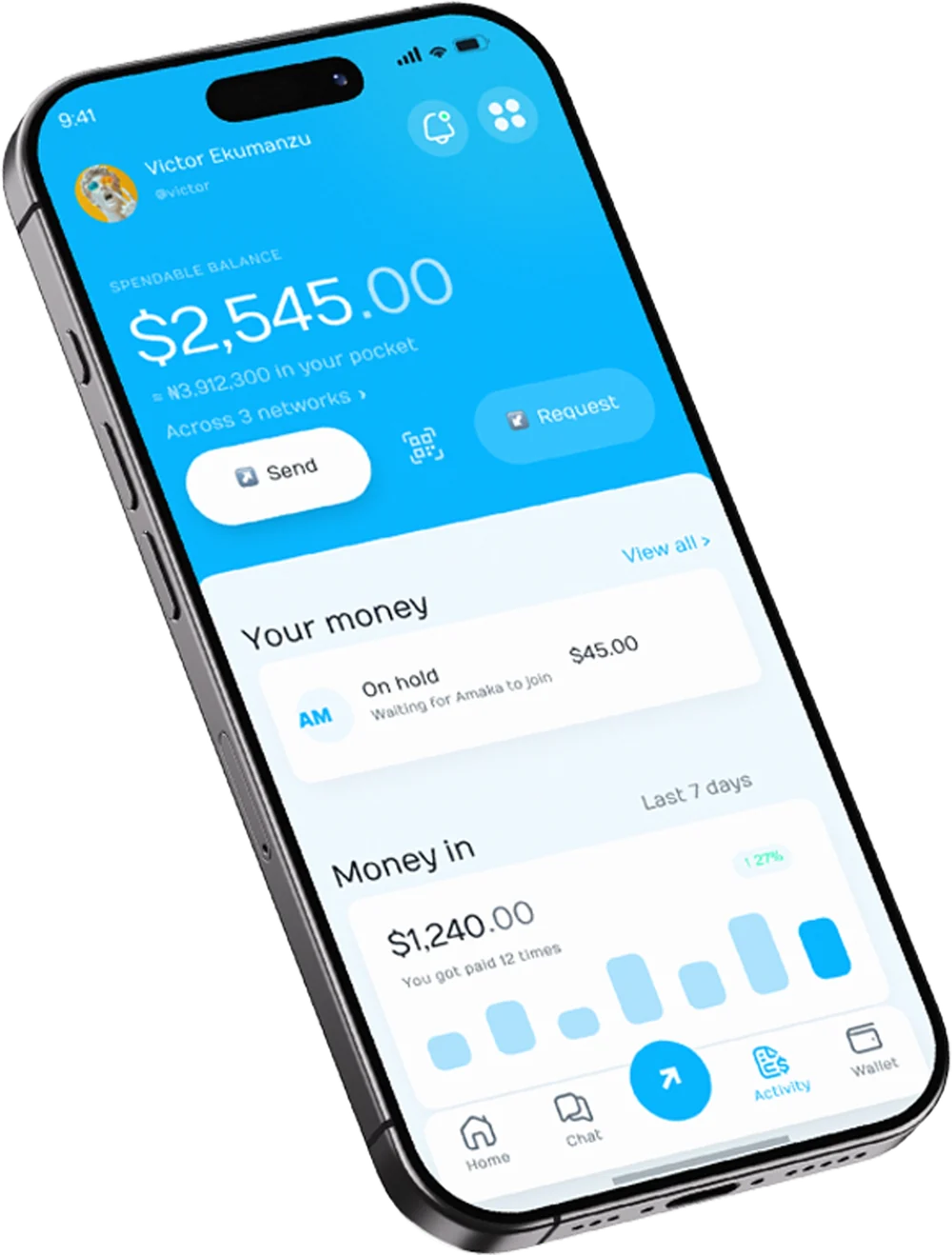
Evabob is a payments app that makes sending money feel like sending a message. You pay people by their @username or email, see your balance in the currency you think in, and a payment to another Evabob account usually lands in about a second.
Behind the friendly surface, your balance is held in digital dollars and euros on Arc, a network built by Circle. You never need to learn those words to use Evabob. The app talks about balances, sending, requests and activity, not wallets, chains or gas.
Evabob is a testnet preview
It runs on test networks with test dollars that have no value. It has never held real money. To try it, get free test dollars from the Circle Faucet. The user manual explains how.
Why Evabob exists
Moving money is still harder than it should be. Sending across a border is slow and expensive. Paying a stranger online means trusting that the goods will arrive. And the apps that could fix this ask people to manage recovery phrases, pick networks and pay fees in tokens they've never heard of.
Evabob starts from how people already talk about money:
- People, not addresses. You pay "@ada" or "ada@example.com". Evabob works out where the money goes.
- Your currency, not the settlement asset. Balances show in dollars with your local currency alongside, so a naira earner can read them at a glance.
- Trust built in. Money can be held until work or goods arrive, and every payment can be proven with a receipt anyone can check.
- Conversation first. Payments live in chat, next to the messages they belong to.
Paying people
Send by @username, email or address
Tap Home › Send, type a name, @username or email, enter the amount on the keypad and confirm with your PIN. The keypad can do sums, so 120+35 works when you're splitting a bill. You can add an optional memo.
Before you confirm, the review screen shows the person's photo, the amount they will receive, and any warning Evabob has about the payee. A payment between two Evabob accounts usually arrives in about a second.
Pay someone who isn't on Evabob yet
Send to an email that has no account and Evabob offers to hold it for them. They get an email, and the money waits for 7 days. When they sign up with that email and finish setting up their wallet, it's released to them automatically. If they don't, it comes back to you.
Scan to pay
The scan button between Send and Request on the home screen reads a payment QR code and fills in the payee for you.
Getting paid
Requests
Tap Home › Request to ask for money. Add the amount and what it's for, and optionally who pays and a due date. Evabob gives you a payment link and a QR code to share anywhere, and tracks the request in your request history.
When you name the payer and set a due date, Evabob reminds them the day before, on the day, and three days after if it's still unpaid. You're told when a request becomes overdue.
Paid by milestone
For bigger jobs, split the request into 2 to 10 lines, one per milestone. The payer approves the whole thing with one PIN; each line is set aside separately and paid to you as you deliver it.
Money in
The Money in card on Home shows what you've been paid over the last 7 days. While the app is open, money arriving plays a short chime, and a payment going out plays its own sound. You can turn both off.
Chat and the Evabob Agent
Every conversation can carry money. From a chat you can ask someone to pay, send them a request card, or pay theirs. A request card shows every line, the total, the due date and its live status. The person receiving it sees Pay and Cancel; if they decline, the card closes for both of you.
Three ways to pay an invoice
Pay it all now
It reaches them straight away.
Pay half, hold half
Half now, half held until the work arrives.
Hold it all
Everything is set aside until you say the work has arrived.
Paid in full
Whichever you pick, the card updates for both of you as money moves.
The Evabob Agent
The Evabob Agent is pinned at the top of your chat list. Ask it anything about your money: what you can spend, how to move money, or whether a payment looks unfamiliar. You can also tell it what to do in plain words, for example "Send $25 to @john".
The Agent never moves money on its own. It shows an exact confirmation card, and only your PIN makes the payment. If you paste a payment link, it opens it for you.
Holding money for work
When you hire someone, you can pay into a held payment. The money is locked on the network before they start, so they know it's there, and it only reaches them when the job is done.
- You pay into the holdThe money leaves your balance and is locked. Neither of you can spend it.
- They mark the work deliveredYou're notified and can check what they sent.
- You have 7 days to raise a problemSay the work has arrived to release it straight away. If you do nothing, it's released to them after 7 days.
If you cancel before the work is delivered, you get your money back at once. Cancelling after delivery needs a reason and goes to a person at Evabob, who reads both sides, the delivered work and the written criteria before deciding. Both of you can add links and photos to that conversation, and both see the reviewer's note.
Who can the money go to?
Only the worker you paid or back to you. The contract holding it can't pay anyone new, and a refund always returns to the person who paid.
Selling with a link
Tap Menu › Sell with a link to make a link for something you sell: a title such as "Ankara dress, size 12", a price, and how many days you need to deliver. Paste it in WhatsApp, Instagram or your bio, or show its QR code.
The buyer's page shows your track record and says: "Pay safely: your money is set aside for me until your order arrives." Each order becomes a held payment and follows the same rules as work: you mark it delivered, and the money reaches you when the buyer confirms or after 7 days. Links last 14 days by default.
Circles and collections
Find both under Menu › Circles and collections.
Money circles
A money circle works like an ajo or esusu: everyone puts in the same amount each round, and each round one person takes the whole pot. You choose the members in payout order (up to 20 people), the amount (at least $1 a round) and how often it runs.
Nobody holds the money, not even you. Members approve their whole commitment when they join, and each round the pot goes straight to whoever's turn it is. If someone misses a contribution, the round pays out what came in, the member who missed owes whoever they shorted, and their own turn moves to the end. They're caught up automatically as soon as their balance can cover it.
Collections
Raise money for something with a target and a deadline. The money is released the moment the target is reached. If the deadline passes short, everyone is refunded automatically. Collections have a public progress page you can share; circles stay private.
Currencies and networks
Dollars, euros and your local currency
Your balance is held in digital dollars, with euros alongside if you have them. The app shows amounts with $ and €, and your local currency (such as naira) as a guide next to your balance.
Convert
Menu › Convert changes dollars to euros, or back. You see the rate and what you'll receive before you confirm, and the fee is shown plainly.
Move money
Your account has a wallet on three networks: Arc, Ethereum and Base (their test versions today). Menu › Move money shifts money between them. You see what arrives on the other side before you confirm, then follow it through three simple states: Sending, On the way, Done.
Your GA
Menu › Your GA is one dollar balance you can top up once and pay out from on any of your networks.
Receipts and activity
Activity lists every payment the moment money moves: who, what, how much and when, filtered by All, Money in, Money out or On hold. Tap any row for its receipt, which you can download or share.
"Paid" receipts anyone can check
Any payment you made can be shared as a link and a QR code. The page shows who paid, how much and when, and re-checks the payment on the network every time it's opened, with a link to check it yourself on the public explorer. Show it to a seller and they can confirm it without taking your word for it.
Nothing is public until you share it, and your memo is never shown. While a payment is still moving, the same link shows Sending, On the way and Done, and updates itself.
Money for software
More and more software can buy things by itself: data, answers, a person's time. Evabob gives it a safe, separate place to spend from.
Agent wallets
Menu › Agent wallets creates a wallet that software can spend from, never your main balance. You fund it with your PIN and give the software a key, which is shown once. Each agent wallet has an allowance: an amount, a time window and the kinds of things it may buy. Above a limit it can pay silently, ask you with a notification, or be refused.
A loop breaker pauses an agent that calls the same thing too often (a sixth call to one endpoint within a minute), and Freeze all stops every agent with one tap. Money in an agent wallet can always be withdrawn back to you.
Pay after proof
When an agent buys from an Evabob seller, the purchase is verified, delivered and checked before it's settled. If what came back isn't usable, it costs nothing. Every paid call keeps an evidence record you can export.
Get paid by agents and work from agents
Menu › Get paid by agents lets you charge software for a file, some text, your API or your time, through one link that works for people and software alike. Menu › Work from agents lists tasks software will pay you for, with the fee set aside before you start.
Safety
Most payment mistakes happen in the seconds before someone presses send. Evabob slows down the risky moments and keeps everyday payments fast.
Your PIN approves every payment
Your wallet is protected by a PIN only you know. Evabob can't move your money without it. You can use fingerprint or Face ID instead.
A 10-minute pause on first payments
The first time you pay someone, the money waits 10 minutes before it goes, and you can cancel from the countdown. It's on by default.
Payee check
Evabob shows who a payee really is and whether you've paid them before, and warns you about raw addresses and look-alike addresses.
Family check
Mark contacts as family and choose an amount (default $100). Paying them more than that needs a 6-digit code sent to your own email.
App lock
Require your PIN or fingerprint to open the app.
Plain warnings
If something fails, Evabob says what happened, for example "The payment did not go through. Nothing left your wallet."
Evabob never asks for your PIN
Nor your API key, recovery phrase or private key. Anyone who does is not Evabob.
Fees
Every fee is shown on the review screen before you enter your PIN.
| What | Fee |
|---|---|
| Evabob fee on money-moving actions | 0.05% of the amount (5 cents on $100) |
| Network cost on Arc | Paid in dollars from your balance. No other token needed. |
| Moving money between networks | The Evabob fee plus Circle's transfer fee, read live and shown as "They receive" |
| Circle and collection payouts | 0.05%, taken from each payout or release |
| Payouts from agent sales | Paid in batches, less 0.05% and $0.02 |
On testnet, all amounts are test dollars.
What runs underneath
This section is for the curious. You don't need any of it to use Evabob.
| What you see | What happens underneath |
|---|---|
| Your balance | USDC in your own Circle wallet on Arc Testnet |
| Euros | EURC on Arc |
| Your PIN | Circle User-Controlled Wallets: the PIN challenge runs on your device, so only you can sign |
| Send | Circle App Kit send on Arc |
| Convert | App Kit swap between USDC and EURC |
| Move money | App Kit bridge over Circle's CCTP |
| Your GA | Circle Gateway unified balance |
| @username and email | IdentityRegistry contract: a hashed email or handle points to a wallet |
| Held payments and orders | PaymentEscrowV3 contract on Arc |
| Circles and collections | MoneyCircles and GroupPots contracts, with no admin |
| Paid calls by software | x402 payments batched through Gateway |
How the pieces fit
Why Arc
Arc is Circle's network where USDC itself pays for transactions, so Evabob users never need a second token for fees. Costs are stable and predictable, and payments confirm in under a second.
Contracts on Arc Testnet
| Contract | Address |
|---|---|
| IdentityRegistryV2 | 0xb14355288fcE19811cccaF1589ea85e3791320a0 |
| IdentityRegistryV3 | 0x7a74c86b6fd0b0232d5d1eb0074547dfe1a4ffd0 |
| PaymentEscrowV3 | 0x37Cb011C7a53e52f569b9c388B6208A71cD0Df39 |
| MoneyCircles | 0x482497289a4F5197f67f98B2535cd23D6238d256 |
| GroupPots | 0x3CBDdab2398e06d5FB496a9DbF9424abD449D795 |
| Admin Safe (2 of 3) | 0xe2Ef46038d30F80B39DA2E775F637BE2fa2635A2 |
| USDC | 0x3600000000000000000000000000000000000000 |
| EURC | 0x89B50855Aa3bE2F677cD6303Cec089B5F319D72a |
The contracts have automated tests but no independent audit yet.
Where things stand
Evabob is honest about what's finished. "Works" means built and exercised by hand on testnet; it does not mean in production.
| Area | State | Notes |
|---|---|---|
| Sign-in, wallet setup and PIN | Works | Wallets on Arc, Ethereum and Base test networks |
| Send, convert, top-up | Works | Market-price conversion needs a pricing partner key |
| Chat, invoices, held payments | Works | Held money settles on chain |
| Activity and receipts | Works | |
| Hiring a person, selling to agents | Works | Real test payments settled end to end |
| Move money | Partial | Works; still being proven across repeated runs |
| Your GA | Built | A full live run is still to do |
| Paid receipts, sell with a link, circles, family check | Built | Public links open once the web app is hosted |
| Agent allowances | Partial | Wired end to end; not yet used by a real agent |
| Alerts to a closed app | Needs setup | Needs a notifications project to be connected |
Not for real money
Evabob has not had an independent security audit, and some known gaps are still open. Don't point it at real funds.
Glossary
The words Evabob uses, and what they mean.
- Balance
- The dollars you can spend right now.
- @username
- Your handle for payments. People can pay you by it or by your email. You can change it once every three months.
- PIN
- The code only you know that approves every payment. It never leaves your device.
- On hold
- Money that has left your balance but hasn't reached anyone yet: waiting for someone to join, for work to arrive, or for a 10-minute pause to end.
- Held payment
- Money locked for a job or an order until it's delivered.
- Request
- A payment you've asked someone to make, shared as a link, a QR code or a card in chat.
- Convert
- Change dollars to euros, or back.
- Move money
- Shift your balance from one network to another.
- Your GA
- One dollar balance you can spend on any of your networks.
- Money circle
- A group that saves together, paying the whole pot to one member each round.
- Collection
- Money raised toward a target by a deadline, refunded if it falls short.
- Agent wallet
- A separate wallet that software can spend from, within an allowance you set.
- Test dollars
- Free, valueless USDC from the Circle Faucet, used while Evabob is on testnet.
Ready to try it?
The user manual walks you through every screen, from sign-in to your first payment.